
Commitments overview
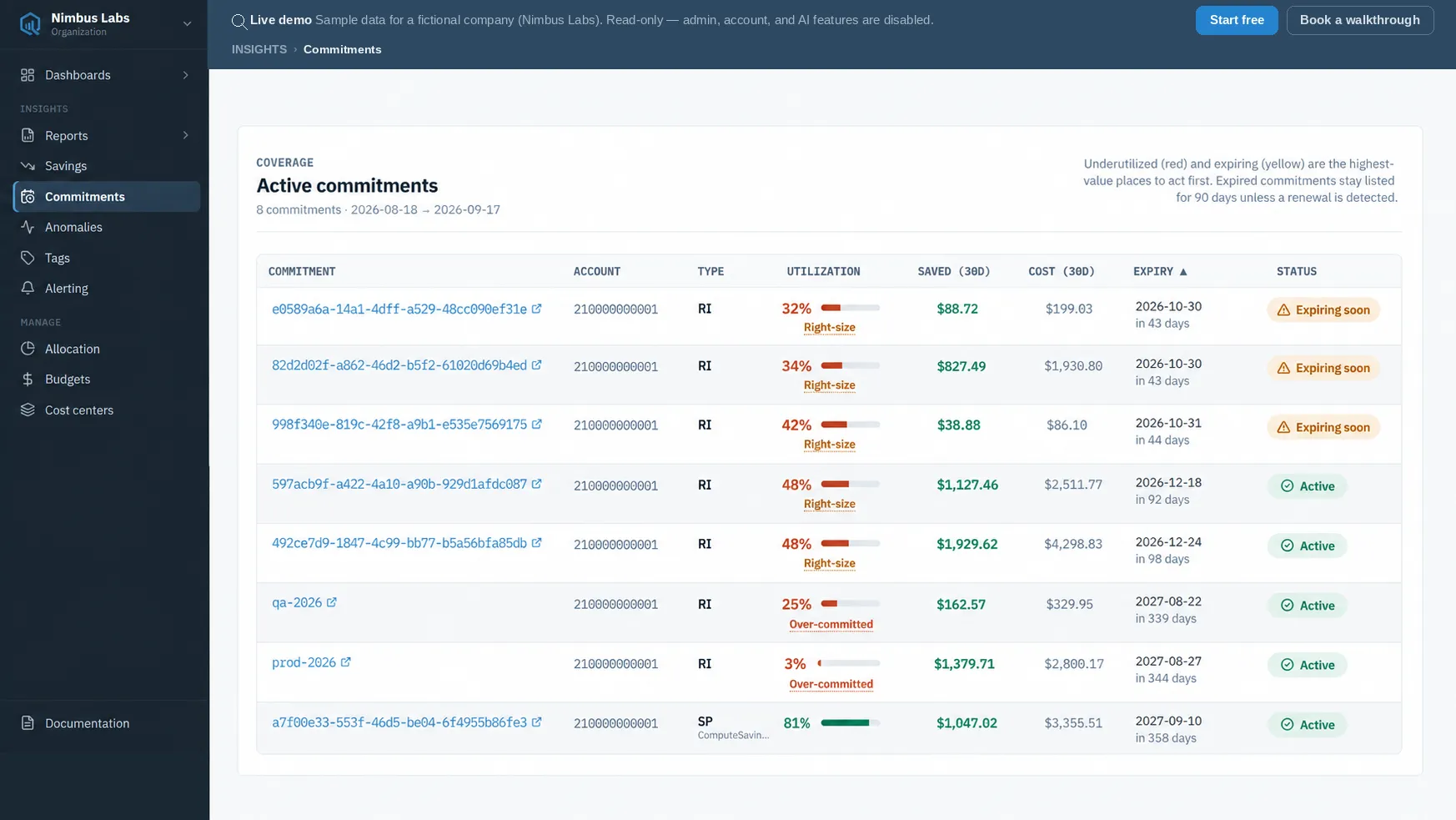
Commitments gives you a single inventory of your Reserved Instances (RIs) and Savings Plans — the discounts you’ve already committed to — so you can see how well they’re being used and what they’re saving before they expire.
Watch: commitments in CloudQuell
Section titled “Watch: commitments in CloudQuell”A short walkthrough of the commitments inventory — utilization, savings, and upcoming expiries.
What you get
Section titled “What you get”For each commitment, CloudQuell tracks:
- Type — Reserved Instance or Savings Plan.
- Status — active, expiring soon, or expired. Expired commitments remain listed for 90 days after their end date, and only while no renewal or repurchase has been detected — see Expiring coverage.
- Days until expiry — how long the commitment lasts.
- Utilization % — how much of the committed capacity you’re actually consuming. Low utilization means you’re paying for a discount you aren’t fully using.
- Dollars saved — what the commitment has saved versus on-demand rates.
- Effective cost — the real, discounted cost of the usage it covered.
Utilization, dollars saved, and effective cost are measured over a trailing 30-day window; days-until-expiry reflects the commitment’s full lifetime. A rollup summary sits on top of the inventory: total commitments, overall utilization, the count expiring within 60 days, how many have already expired, and total dollars saved. That summary is your at-a-glance health check.
Where to go next
Section titled “Where to go next”- Reservations & Savings Plans — how the two commitment types differ and what utilization and savings mean.
- Expiring coverage — surface the commitments nearing expiry so a discount doesn’t quietly lapse.
- Savings & recommendations — where CloudQuell suggests new commitment purchases sized to your usage.
You can also review commitments through an AI agent connected to the CloudQuell MCP server — ask “which Savings Plans are under-utilized?” and it reads the same inventory. Only AWS is live today; other providers are in development.