
Budgets overview
A budget pairs a spending target with a period and a scope, then tracks your actual spend against it so you know — before the period closes — whether you’re on pace or heading over.
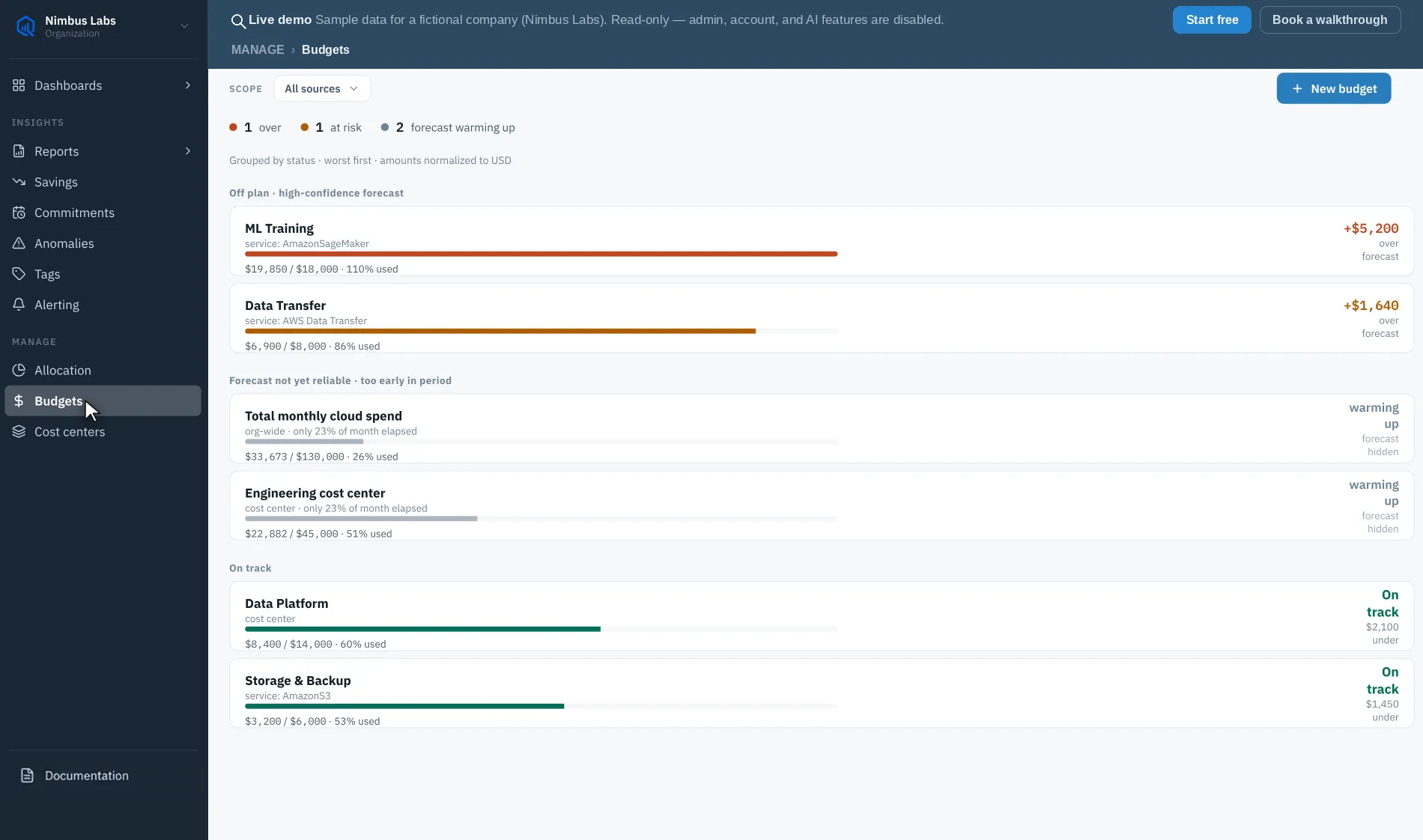
What a budget tracks
Section titled “What a budget tracks”Each budget definition carries a name, a target amount in your organization’s display currency, a period (monthly, quarterly, or annual — monthly by default) anchored to the budget’s start date, threshold percentages, and its scope. Against that definition, CloudQuell continuously computes:
- Actual — spend so far in the current period.
- Forecast — a run-rate projection of where the period will land at the current pace.
- Actual % and forecast % — both expressed against the target, with the forecast’s gap to target reported as the variance.
- Status — on track, at risk, or over, derived from actuals, forecast, and your thresholds (see budget status). Crossing a configured threshold (for example 80% or 100%) is recorded in the alert firing history.
Together these tell you not just “how much have we spent” but “are we going to blow the budget,” which is the question budgets exist to answer.
Scope — what a budget covers
Section titled “Scope — what a budget covers”A budget doesn’t have to cover all spend. You can scope one to:
- The whole organization — the default when you don’t narrow it.
- A single integration — one connected account.
- Specific accounts within an integration — pick the linked accounts (AWS), subscriptions (Azure), or projects (Google Cloud) the budget should cover, and spend in the connection’s other accounts is ignored. Choose the integration first: the account list comes from that connection.
- A cloud platform — every connected integration for one provider at once.
- A service — a single AWS service in the dashboard (the API and MCP server accept a list).
- A tag — a tag key, optionally narrowed to a single value (for example
Environment = prod). - A cost center — a defined cost center in your allocation taxonomy. A budget on a parent center measures its whole subtree, using the same allocation engine as the allocation breakdown, so the two always reconcile.
Scope dimensions combine — a service or tag scope can additionally be pinned to a single integration, and everything you set must match for spend to count. Scoping lets you budget the way your teams are organized — per environment, per service line, or per owning cost center — instead of only at the top line.
Managing budgets
Section titled “Managing budgets”Budgets are fully editable in the dashboard. You can:
- Edit a budget’s target, period, scope, or thresholds at any time.
- Duplicate one to spin up a similar budget quickly.
- Enable or disable a budget without deleting it, to pause tracking.
- Delete a budget you no longer need.
There’s no limit on how many budgets an organization can define, on any paid tier.
Next steps
Section titled “Next steps”- Creating a budget — set a target, period, scope, and thresholds.
- Budget status & pace — read actuals, forecast, and status.